
A cable organizer should make equipment easier to change as well as easier to look at. Hiding every lead in a tight bundle can turn the next replacement into a difficult job.
We compare simple ties and routes with furniture-mounted connection systems, keeping power access and moving-desk slack part of the same plan.
Organize the connection point as well as the loose lead
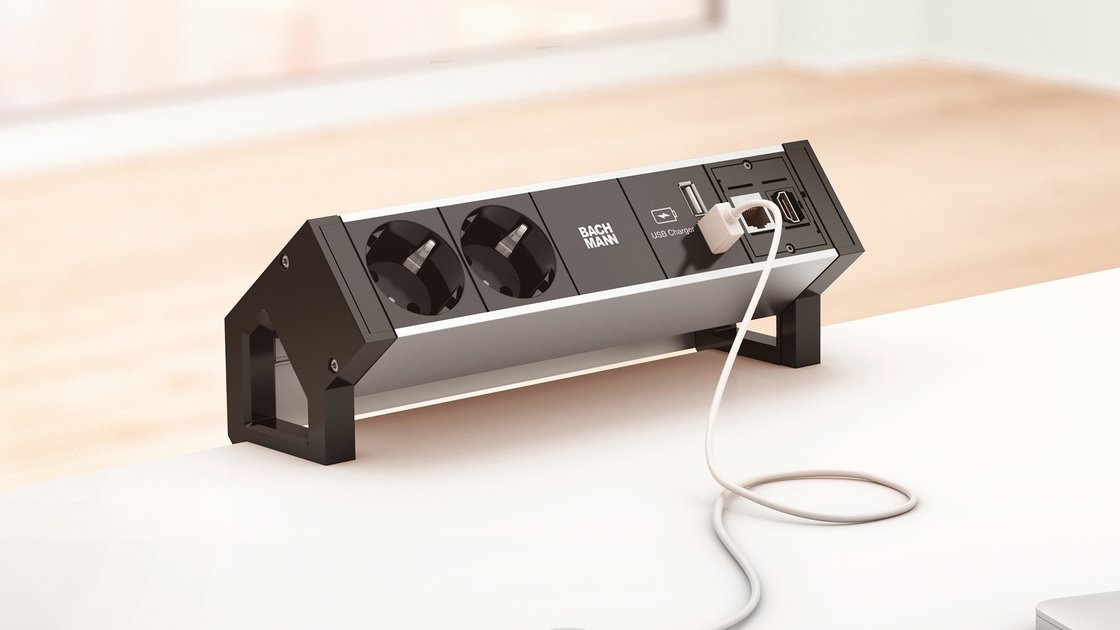
BACHMANN DESK 2 ALU BLACK ↗ illustrates a desktop connection unit with a separate cable-routing arrangement. Its configurable modules are the more designed approach when connections must stay visible and reachable. Select a country-appropriate version and the correct supply components; the linked regional range is a construction reference, not a universal US plug specification.
For a simpler setup, label both ends and use reusable ties with an accessible under-desk tray. The tray should support the equipment and allow plugs to be removed without unfastening the whole route. On a height-adjustable desk, test the full travel with the actual leads before shortening loops. More expensive concealed routing is useful when it preserves this service access.
Map devices before buying organizers
List power, display, data and charging connections. Notice which devices remain permanently connected and which leave with you. Locate outlets and trace the route to each item. A cable that is just long enough while seated may be pulled tight when a height-adjustable desk rises. Keep the original equipment and power ratings in mind.
Leave useful slack
Allow movement for the desk, monitor arm and devices without leaving a large loop across the floor. Check the full travel slowly after installation. Keep cables clear of hinges, lifting mechanisms and sharp edges. Do not suspend a heavy power brick by its lead or let a connector carry the weight of a bundle.
Use labels and reusable ties
Mark connections at both ends where similar leads are easy to confuse. Reusable ties make changes simpler than a permanently compressed bundle. Avoid tightening around cables so forcefully that jackets deform. Group routes so one temporary laptop cable can be removed without dismantling the whole desk. Keep access to the wall plug or other intended disconnect point.
Power needs its own checks
Use properly rated power equipment intended for the local supply and devices. Do not chain power strips or treat a cable box as permission to hide overloaded or damaged equipment. Follow ventilation and mounting instructions. A cable opening with a brush or grommet can protect an edge, but its size must allow connectors to pass without force.
Test a real change
Unplug one device, replace it and raise or lower the desk if applicable. If the process requires crawling through an inaccessible bundle, revise the route. A few clips and ties may be enough for a small setup; compare lower-cost trays by mounting and usable dimensions. Which problem is most disruptive: floor clutter, short leads or replacing a device?
The linked products are examples of different approaches. Similar solutions can be found from other manufacturers and stores. Compare the exact model, supplied components and installation requirements. Product photographs are credited to their source. This article describes functions and planning considerations, rather than a hands-on test.