
An adjustable workstation should fit the seated task as well as the standing one. Raising only the screen or only the keyboard can create a different awkward arrangement.
This guide compares a complete adjustable desk with a desktop converter and separate display adjustment, so each purchase addresses a specific part of the working position.
A converter changes the existing desk
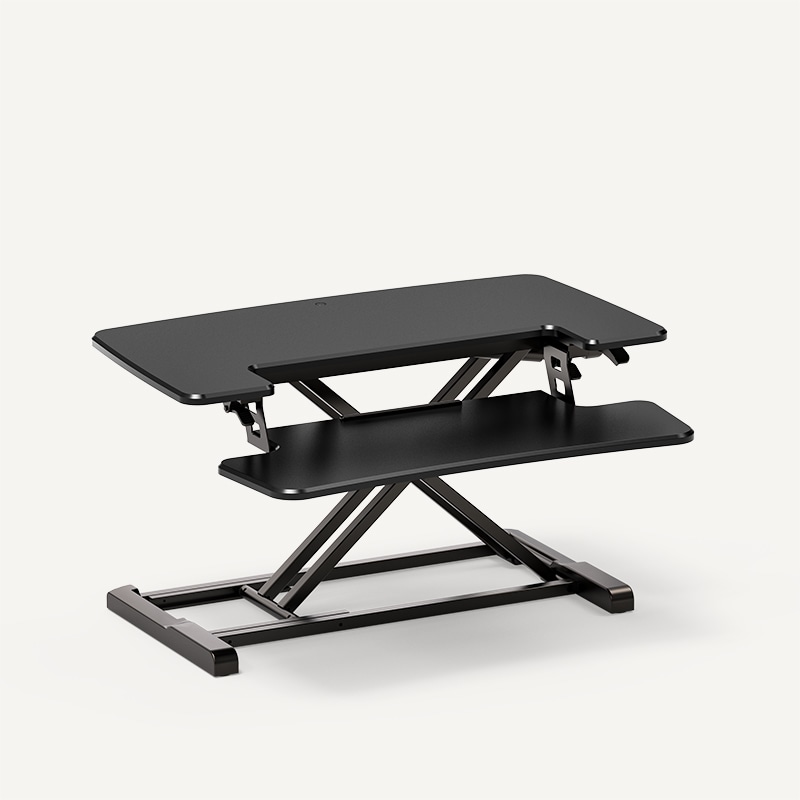
FlexiSpot M7 ↗ is a gas-assisted desktop converter with a removable keyboard tray. It sits on an existing desk instead of replacing the entire base. Check the lowest working level too: the converter adds height even when lowered, and its footprint must fit the supporting top.
A full sit-stand frame moves the main surface and its contents together, at the cost of more equipment and installation. A monitor arm changes display position independently but cannot correct a keyboard surface at the wrong height. Compare the complete loaded setup, movement and cable route. Adjustment range matters more than a motor or mechanism label.
Check the whole working position
Consider chair, keyboard, screen and foot support as an arrangement. Set up the tasks you actually perform, including handwriting or reference documents. A desk height that suits typing may not suit a different task equally well. Avoid treating a single measurement as a universal prescription for every user.
Working depth and stability
A narrow top can put a large monitor too close or leave little room for the keyboard. Check the arrangement at both seated and standing positions. Test stability with normal typing and monitor movement. A low price or high capacity figure alone does not establish how a desk feels with your particular equipment.
A converter changes the existing desk
A desktop converter may let a keyboard and display rise without replacing the base desk. It also adds height in the lowered state and can reduce usable work surface. Check the original desk’s capacity and the converter’s support area. Make sure its operating motion does not push equipment into the wall or leave cables taut.
Keep the movement zone clear
Trace cables through the full permitted range and preserve the manufacturer’s clearances. Watch for shelves, window sills, chair arms and storage below. An anti-collision feature is not a reason to leave obstacles in the path. Follow instructions for controls and keep children away from operating mechanisms as required.
Choose adjustment you will use
Changing position can be part of a varied routine, but a standing desk is not a guarantee against discomfort or a substitute for breaks. If the main problem is a cramped top, a larger fixed desk may help more. Try the intended tasks before choosing. What would adjustment solve for you: shared use, changing position or a poor seated height?
The linked products are examples of different approaches. Similar solutions can be found from other manufacturers and stores. Compare the exact model, supplied components and installation requirements. Product photographs are credited to their source. This article describes functions and planning considerations, rather than a hands-on test.